
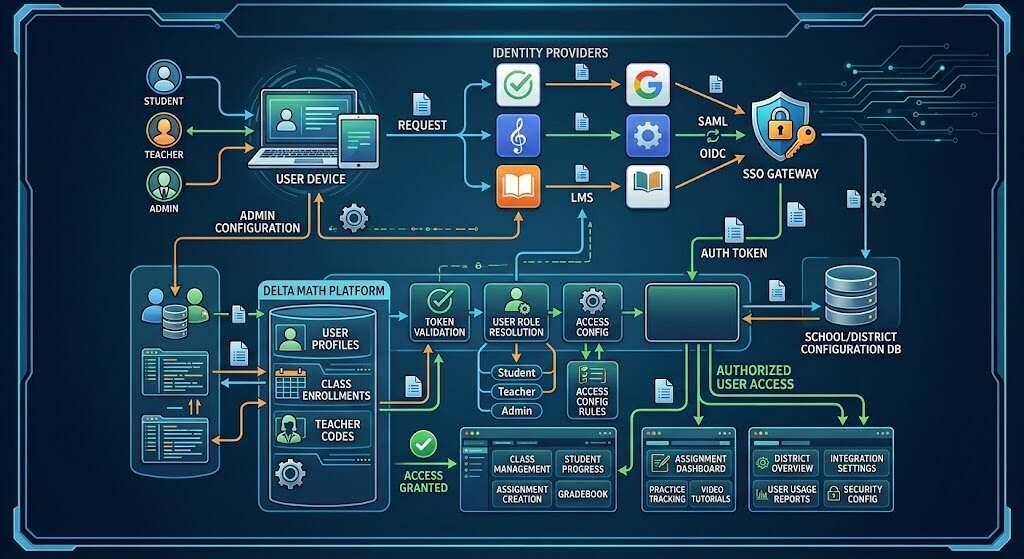
If a DeltaMath login fails even though you have entered the right password, the problem is not a bad login but identity routing. For those troubleshooting DeltaMath authentication in 2026, it’s important to note that the story of access is more defined than ever. Delta Math can be seamlessly incorporated into the way schools are run today: easy web access, Google integration, LMS launches, and district SSO systems. As per current DeltaMath help articles, the site integrates with Google Classroom, Canvas, Schoology, Infinite Campus Learning Suite, ClassLink, and Clever.
It’s important because today’s deltamath login process is no longer “enter email and password and hope for the best.” For many schools, the login process is actually an identity management and rostering problem. The student thinks that DeltaMath doesn’t work, while in reality, the account is supposed to launch from Clever, Canvas, or ClassLink. DeltaMath help materials and setup guides clearly explain the difference for schools that use LMS and SSO access.
Why the DeltaMath Login Process Looks Different in 2026
The most significant change is getting rid of the need for usernames and passwords. The Clever platform has become a consolidated educational identity layer, which means that users only need to click once to use learning applications.
There are three different options of the deltamath login for DeltaMath users:
- Accessing the app directly via deltamath.com
- Using the school SSO portal, for example, Clever or ClassLink
- Connecting to the LMS, for instance, Canvas or Schoology
This is the main idea that parents, teachers, and students need to understand first: the correct deltamath login process is based on the configuration of the school.
The 3 Primary Access Routes
1. Direct login at deltamath.com
Most users start at deltamath.com and log in using their personal login credentials. This is the easy method of logging into delta math when a school doesn’t require LMS only or SSO only login. From a practical point of view, this is how most teachers log into delta math to check settings, classes, and account information. According to DeltaMath’s help section, the teacher dashboard shows account information which includes the teacher’s name, email address, and class code.
2. SSO login through Clever or ClassLink
DeltaMath Login is normally performed using Clever or ClassLink instead of the DeltaMath password in cases where the district implements centralized identity management. According to DeltaMath’s Clever FAQ, the website supports both Clever and ClassLink. In turn, Clever considers SSO to be part of the overall process of school identity and access.
3. LMS launch through Canvas or Schoology
Increasingly many schools are requiring students to jump directly into assignments on the LMS platform that they use. The help section of DeltaMath confirms that the program is compatible with Canvas and Schoology, and the guide for setting up DeltaMath on Canvas indicates that DeltaMath needs to be set up in Canvas.
What Access Configuration Really Means for Teachers and IT Teams

This is where the majority of those called “login problems” actually fall under the umbrella of configuration problems.
If the school is using Canvas, the teachers and administrators cannot just point the students to deltamath.com without configuring the app first. The Canvas integration requires some kind of credential setup based on the DeltaMath account, which is very clear in the DeltaMath Canvas documentation.
If a district uses SSO, the DeltaMath login process will require students to gain access through the official portal. The student trying to reset the password directly may find himself at a dead end since the account was made to be authenticated via Clever, ClassLink, or some other platform.
Practical Examples That Match Real School Use
A few examples will help to understand this better:
Example 1: Middle School with Clever
The student reports that the deltamath login page won’t accept his password. In most cases, the problem lies not in the password; the school may expect the student to log in to DeltaMath via Clever. It corresponds to the official DeltaMath integration recommendations and the single sign-on policy of Clever.
Example 2: High School teacher with Canvas
The high school teacher integrates DeltaMath into her Canvas course. But the students cannot access their assignments correctly. Probably the solution is to check whether the Canvas app was set up properly by using the credentials of the teacher’s DeltaMath account. DeltaMath setup guide mentions this step.
Example 3: Teacher controlling access for students
Before providing the access instructions to the students, the teacher needs to make sure that he knows all the account details and/or class setup information. The DeltaMath help articles say that the teacher’s account section contains the login data and the teacher code, which is usually used as an anchor for students to get into the right class environment.
These examples show real-life cases that happen in the schools. That is why deltamath login is simple in one district and complicated in another one.
Also Read: What Is WMI Provider Host? How To Fix 100% High CPU Usage
Best Practices for a Smoother DeltaMath Login

For those who seek to minimize issues with access, here is what works:
- Verify the login process for your particular institution, whether direct, Clever, ClassLink, Canvas, or Schoology
- Teachers should check their accounts and classes prior to issuing the first assignment
- In case of Canvas, verify that the application credentials are properly set up
- If students are enrolled via SSO, have them access the site using the official school link
- Bookmark deltamath.com but access it according to the school guidelines if necessary
Here is the actual 2026 guide to deltamath login: match the access route to the school’s configuration.
Conclusion
DeltaMath login in 2026 should be understood as an access management process and not just a login box. If a district uses SSO direct access through deltamath.com, you do not have to worry about anything. In case your school uses Clever, ClassLink, Canvas, or Schoology, you will have to make sure that you use the correct launch point. This will save a lot of trouble for both the students and the teachers/administrators. For anyone trying to fix deltamath login problems, the quickest solution is most likely to find out how your school set up its access tool.
FAQs
What is the proper DeltaMath login URL?
Most people are looking for the option to log into Delta Math at deltamath.com, although some educational organizations use Clever, ClassLink, Canvas, or Schoology for authentication instead.
Does DeltaMath offer single sign-on in 2026?
Yes. The help section of DeltaMath includes integrations like Clever and ClassLink, and Clever explicitly supports the platform as an SSO solution.
Is it possible to log into DeltaMath from Canvas?
Yes. DeltaMath provides a Canvas integration, and according to its instructions, it should be configured using the credentials from the DeltaMath account on Canvas.
Why could DeltaMath login fail even with a correct password?
One possible reason is that you should try logging in using an integrated service (like Clever, ClassLink, Canvas, or Schoology) instead of through the standard password flow. DeltaMath mentions these services among the supported integrations.
How can teachers get their account info for the setup?
According to the teachers’ guide of DeltaMath, you can find your account details including name, login information, and teacher code in the account area.
