

Your salary SMS has arrived, and now the bank wants your latest payslip for a loan file. For employees at Global Healthcare Billing Partners (GHCBP), that means opening HRMS Globex. The portal looks simple, but a mistyped employee code or an expired captcha locks people out surprisingly often.
This guide covers logging in, downloading payslips, applying for leave, and the fixes that actually work.
- What Is HRMS Globex, and Who Is It For?
- HRMS Globex Login: A Step-by-Step Walkthrough
- Payslip Download in HRMS Globex Without the Guesswork
- Applying for Leave Through HRMS Globex
- HRMS Globex Login Problems and Proven Fixes
- Forgot Password? Reset It the Right Way
- Smart Security Habits for Every HRMS Globex User
- Frequently Asked Questions
- Conclusion: Make HRMS Globex Work for You
What Is HRMS Globex, and Who Is It For?
HRMS Globex is the employee self-service portal at hrms.theglobex.com. The portal serves the staff of Global Healthcare Billing Partners (GHCBP), a Chennai-based medical billing and RCM company founded in 1999. According to AmbitionBox, the company employs over 5,000 people across India.
Day to day, staff use HRMS Globex to check salary slips, attendance, and leave without emailing HR.
Note: This is an independent guide. Access is issued by your employer, and menu names can change when the company updates the system.
HRMS Globex Login: A Step-by-Step Walkthrough
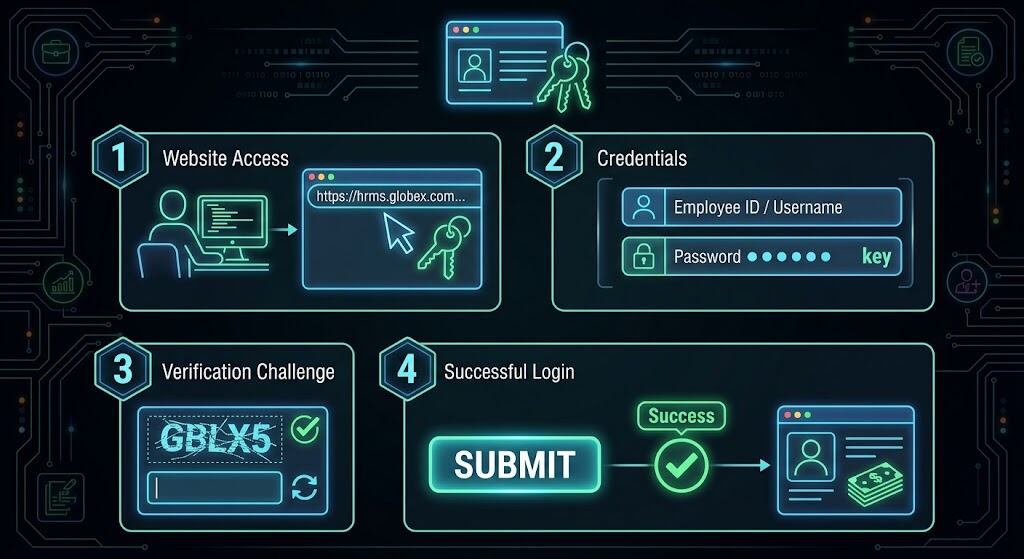
The HRMS Globex login page requires only three inputs from the user: username, password, and captcha.
- Manually type hrms.theglobex.com into your browser to avoid look-alike links. Avoid look-alike links.
- Enter your user name: for most employees this is the employee code HR gave you at onboarding.
- Enter your password: if HR gave you a temporary password, change it right after your first login.
- Fill in the captcha: type it exactly as shown.
- Click Login.
Payslip Download in HRMS Globex Without the Guesswork
Once you’re in HRMS Globex, open the Payroll or Payslip section, choose the month and year, then view or download the PDF.
Practical example: Say a medical coder needs three months of payslips for a two-wheeler loan. Download all three in one sitting, then check the name, employee code, bank digits, and that net pay matches the bank credit. If a month is missing, payroll usually hasn’t published it yet. It’s not a login fault.
Keep in mind that downloaded corporate payslip PDFs are frequently password-protected—usually requiring your PAN or date of birth—so unlock and verify the file before forwarding it directly to a bank manager.
Applying for Leave Through HRMS Globex
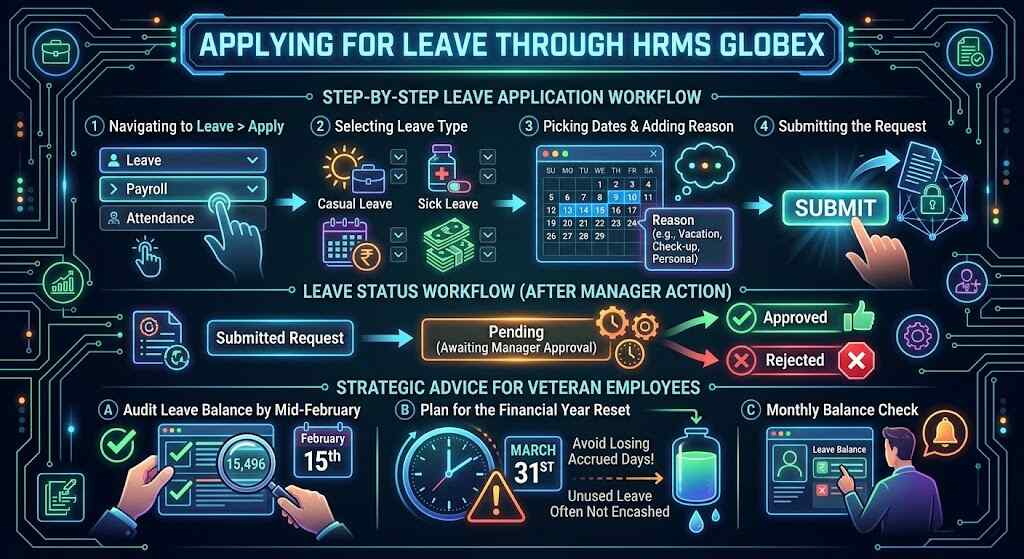
Go to Leave > Apply, choose the leave type your policy allows (casual, sick, or earned), pick the dates, add a reason, and submit. The status moves from Pending to Approved or Rejected once your manager acts.
What employees say: On AmbitionBox, salary reviewers have pointed out that leave isn’t encashed at full and final settlement. The company’s work-life balance score there is 3.4 out of 5, based on more than 500 reviews. So check your HRMS Globex leave balance every month.
Because unused leave often cannot be encashed, veteran employees recommend auditing your balance by mid-February so you can schedule time off before the March 31st financial year reset potentially wipes out your accrued days.
HRMS Globex Login Problems and Proven Fixes
| Problem | Likely Cause | Quick Fix |
|---|---|---|
| “Invalid user name or password” | Caps Lock on, wrong code, or old password | Retype carefully, or use Forgot password? |
| Captcha keeps failing | Typo or expired captcha | Refresh it and type it again straight away |
| Blank or frozen page | Browser cache or extensions | Clear the cache or try an incognito window |
| Account locked | Too many failed attempts | Wait, then contact HR or IT |
| Payslip not showing | Payroll not published yet | Check again after the payroll cycle |
| Leave stuck on “Pending” | Manager hasn’t acted yet | Send your manager a polite reminder |
Forgot Password? Reset It the Right Way
Click Forgot password? under the login button. The HRMS Globex reset page asks for your Employee Code. Enter it and follow the instructions. If your email or mobile number on file is outdated, the reset can’t reach you. Ask HR to update them first.
Smart Security Habits for Every HRMS Globex User
Payslips contain your salary, bank details, and tax IDs. Don’t save passwords on shared office computers, always log out, and never share your login. Treat any message asking for your HRMS Globex password as phishing.
Frequently Asked Questions
1. What is the official web address for the HRMS Globex login?
It’s hrms.theglobex.com. Bookmark it.
2. Can I use HRMS Globex on my phone?
Usually, yes, through a mobile browser. For saving payslip PDFs, a laptop is easier.
3. Why can’t I see this month’s payslip?
It probably hasn’t been published yet. Check after payroll closes, then ask HR.
4. How can I reset a forgotten HRMS Globex password?
Select “Forgot password?”, type in your employee code, and proceed with the on-screen instructions.
5. Who is the right point of contact if I get locked out of my account?
Your HR or IT helpdesk. Only they can unlock it.
Conclusion: Make HRMS Globex Work for You
HRMS Globex isn’t just for emergencies. It contains your financial transactions, your leave entitlements, and evidence of your employment history. Bookmark the official address, keep your employee code handy, download each payslip as soon as it’s published, and check your leave balance before planning time off. When a login fails, work through the table above before raising a ticket, because most problems take under two minutes to fix. A little routine now means no panic later, whether a lender wants paperwork or you’re preparing your full and final settlement.
