

You hand a friend your phone to show one sunset photo, and they keep swiping toward your passport scan and bank screenshots. That jolt of panic is why a secure photo vault matters.
Quick clarification: Thealite Keep Safe isn’t an app. It’s a plain-English safety and privacy publication, and this Thealite Keep Safe guide follows the same idea: fewer gimmicks, more habits that hold up.
Research note: checked against official documentation and app-store reviews, October 2026.
- Before You Download: Who Are You Hiding Photos From?
- Secure Photo Vault Showdown: Built-In vs. Dedicated (2026)
- The Thealite Keep Safe Setup: Six Steps That Protect You
- What Real Photo Vault App Users Learned the Hard Way
- Your Top 5 Photo Vault Questions, Answered
- Final Word: Privacy Is a Habit, Not an App
Before You Download: Who Are You Hiding Photos From?
Every Thealite Keep Safe setup starts with this question, because your answer decides which tool you need.
- Casual swipers: built-in tools that hide photos on iPhone or Android work fine.
- People who know your passcode (a partner, a curious teen): you need a private photo vault with its own PIN.
- Thieves or a dead phone: you need a backup you’ve actually tested.
That middle group is where people get caught out. Anyone with your screen lock can open Google Photos Locked Folder, and on iPhone, Face ID falls back to your passcode. A built-in vault is only as private as that code.
Secure Photo Vault Showdown: Built-In vs. Dedicated (2026)
| Option | Unlocks with | Own PIN? | Backup | Cost |
|---|---|---|---|---|
| iPhone Hidden album | Face ID, Touch ID or passcode | No | iCloud Photos, if enabled | Free |
| Google Photos Locked Folder | Phone screen lock | No | Optional; you have to switch it on | Free |
| Samsung Secure Folder | Own PIN or biometrics | Yes | No new backups | Free on Galaxy |
| Keepsafe Photo Vault | Own PIN or biometrics | Yes | 200 items free; 10,000 with Premium | Free with ads; $23.99/yr or $9.99/mo (US) |
Samsung confirms that Secure Folder “no longer supports backing up data,” so keep your own copy.
The Thealite Keep Safe Setup: Six Steps That Protect You
- Strengthen your passcode. Use at least six digits, and your birthday doesn’t count.
- Set up your private photo vault. To hide photos on iPhone, select them and tap More (•••) > Hide. Then go to Settings > Apps > Photos, leave Use Face ID on and turn off Show Hidden Album. On Android, open Google Photos > Collections > Locked > Set up Locked Folder. For Keepsafe, sign up, verify your email and create a PIN.
- Lock down the reset path. Keepsafe recovers forgotten PINs through your verified email, so protect that inbox with two-factor authentication. Your vault is only as safe as that email.
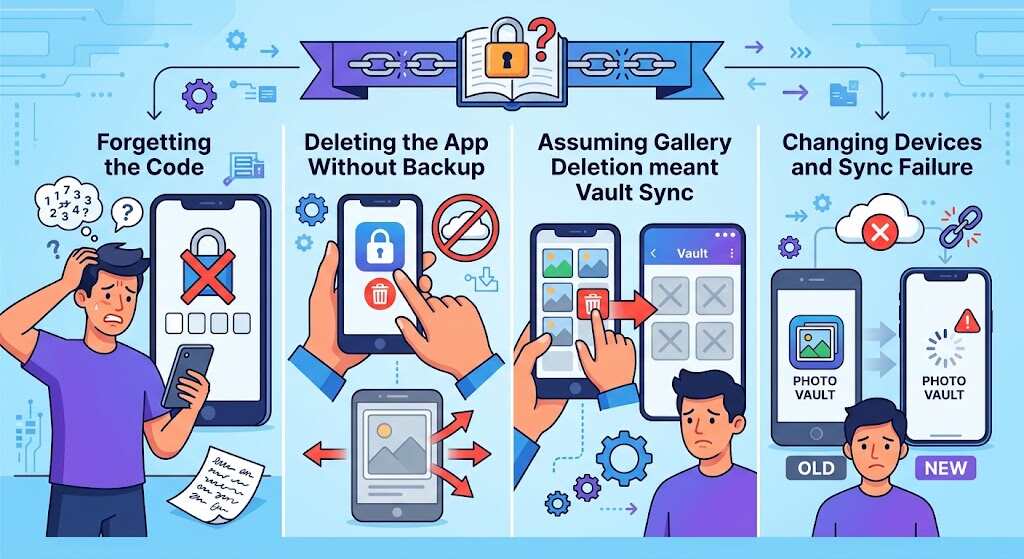
- Run the Thealite Keep Safe restore drill. Before you delete anything, add five test photos, sign in on a second device and check that they come back at full resolution. Keepsafe’s Space Saver keeps only compressed copies on your phone, so test before you wipe an old phone.
- Move, then clean up. Let Keepsafe delete the gallery originals, and keep the app open until syncing finishes. Then empty Recently Deleted (iPhone keeps items there for 30 days) or your Android trash. Also check chat apps that saved their own copies.
- Add decoys if you need them. Keepsafe Premium adds a decoy vault with a fake PIN, intruder alerts and album locks. That helps if someone ever pressures you to open it.
Also Read: How Personal AI Search Audits Keep Your Private Data Safe
What Real Photo Vault App Users Learned the Hard Way
Keepsafe Photo Vault has 4.7 stars from 382K US App Store ratings and 4.6 from over two million Google Play reviews. One App Store reviewer sums up the good side: “My wife and I have been using this app for years… never had issues or lost any pics.”
The bad side looks different. In June 2026, one Google Play reviewer said the app showed everything as backed up, yet nothing restored after their phone died, even with a yearly Premium plan. Another lost over 1,000 items and got back less than half. A March 2026 Google Photos Community post describes a backed-up Locked Folder that showed up empty on a new phone.
The Thealite Keep Safe takeaway? Nobody in these stories had their lock cracked. Every case was a backup problem, and most happened during a phone switch. That’s why step four matters more than any fancy feature.
Your Top 5 Photo Vault Questions, Answered
Is Thealite Keep Safe a photo vault app?
No. Thealite Keep Safe is a safety information website. This guide covers tools like Keepsafe Photo Vault.
What’s the safest free way to hide photos on iPhone?
Use the Hidden album with Face ID and hide the album itself. Then turn on Advanced Data Protection for end-to-end encrypted iCloud Photos, which isn’t available to new UK users.
Does Google Photos Locked Folder back up automatically?
Only if you turn backup on. Otherwise those photos exist only on that phone.
Is Keepsafe free?
Yes. The free version has ads and backs up 200 items. Premium raises that to 10,000 and adds the decoy vault and intruder alerts.
What if I forget my vault PIN?
Keepsafe resets it through your verified email. Samsung provides an optional “Reset with Samsung account” feature. Built-in vaults use your phone passcode.
Final Word: Privacy Is a Habit, Not an App
No photo vault app can protect a picture you never moved, a passcode you’ve shared or a backup you never tested. Pick the private photo vault that fits who you’re hiding from, secure the email that can reset it, clear out the leftover copies and run your restore drill today, not the day your phone dies. That’s the real Thealite Keep Safe promise: a secure photo vault that still works on your worst day. Bookmark this Thealite Keep Safe checklist for your next phone upgrade.
