

The 404 Not Found error is one of the most common errors on the internet. One click and you are left at a dead end, making you wonder whether the website is down or outdated and untrustworthy. In other words, the 404 Not Found error is not only a technical glitch but also a user experience issue.
The most basic explanation of what 404 Not Found means is that the server is up but the page or resource cannot be found. According to MDN, this status code does not mean whether the page is temporary or permanently gone; 410 Gone is used in the latter case. Thus, it is normal to get a 404 error sometimes, but frequent 404 errors may make your site difficult to use and waste your crawl budget and deter visitors.
- What Does a 404 Not Found Error Mean
- The Most Common Reasons You Get 404 Not Found
- How to Troubleshoot 404 Not Found Step by Step
- 4. Analyze internal links
- Practical Examples of Fixing 404 Not Found
- What Site Owners and Users Commonly Experience
- How to Prevent 404 Not Found in the Future
- Conclusion
- Frequently Asked Questions
What Does a 404 Not Found Error Mean
The first reaction of a visitor to the page not found error is thinking that the whole site is not working properly. Most often, it is not true. The 404 Not Found response just means that the URL you entered does not refer to any active resource anymore, but the server itself works well.
It matters because the 404 error is not a server crash. It is not a permissions issue either. As MDN says, the right meaning of the 404 error is that the requested resource is not there anymore and site owners should work on reducing broken links for their readers’ sake.
The Most Common Reasons You Get 404 Not Found
There are several reasons for the 404 not found error code:
- Incorrect URL entry
- Page slug change
- Content removal with no redirect
- Links on the website point to the old URL
- Migration or CMS update has changed the permalinks
- Path to some files/images/scripts is broken after the deployment
There is one more interesting issue – soft 404. When it comes to Google Search Console conversations, there are lots of cases when users complain about pages showing a nice “missing” message, but not actually having a 404 HTTP status. So basically, it’s a case when the page looks like not found for users, but not for search engines.
How to Troubleshoot 404 Not Found Step by Step
To solve a problem of 404 not found in the proper way, use the following steps.
1. Check the URL first
Look for misspellings, missing hyphens, wrong folder path, wrong case of letters, or unnecessary characters at the end. The surprising amount of 404 errors results from such small things.
2. Refresh and try to access the page in another browser
Sometimes cached files or wrong redirects cause a fake error of page not found. It’s elementary, but still a good step to do before going further.
3. Verify if the page was moved or deleted
Answer the question: Has this page ever existed? If yes, decide what you need to do next:
- Restore the page;
- Redirect it to a similar one;
- Leave it as 404 not found if there is no way to replace it.
The thing is that not every 404 not found should be fixed. This fact is confirmed by SEO advice and troubleshooting practices used in the industry.
4. Analyze internal links
Check your own navigation menu, blog posts, category pages, or XML references. Dead links on your website cause the repeated 404 not found errors and make people frustrated.
5. Examine redirects after migrations
One of the common cases when this situation happens is migration of the website when /blog/post-name becomes /articles/post-name, but nobody cares to map the URLs.
6. Examine server response codes
It’s necessary to check not only the page itself, but also the server response code. If the page says “page not found”, the code should be 404, not 200 OK.
Also Read: What Is WMI Provider Host? How To Fix 100% High CPU Usage
Practical Examples of Fixing 404 Not Found
This is how it all works in terms of website administration.
Example 1: Blog post URL changed
The URL of a blog post is changed from /best-email-tools to /email-marketing-tools-2026. The previous URL becomes a 404 Not Found. It is best to perform a 301 redirection of the old URL to the new one.
Example 2: Discontinued product
An online shop discontinues a product without providing any substitute for it. In such a case, it is okay to have a proper 404 Not Found. However, when there is something similar to it, it is better to redirect the user to the respective product or even category page.
Example 3: Typo in an internal link
In a help article, there is a typo /contcat-us instead of /contact-us. This is an example of a classical 404 error due to human mistake, and it is usually the easiest fix to make during an audit.
What Site Owners and Users Commonly Experience

This is because there have been instances where site owners report that “the page looks good on the backend side but Search Console reports 404 or soft 404.” In many instances, the problem is not about the content but the response code, the use of placeholder content, or the redirect structure which can create confusion.
When looking at the consumer point of view, some of the common suggestions when it comes to troubleshooting in consumer support forums include checking the URL, clearing the cache and trying again since some “page not found” errors are caused by out-of-date data on the side of the consumer. This is because, when it comes to the experience of many support teams, some 404 not found problems are real while others are temporary.
How to Prevent 404 Not Found in the Future
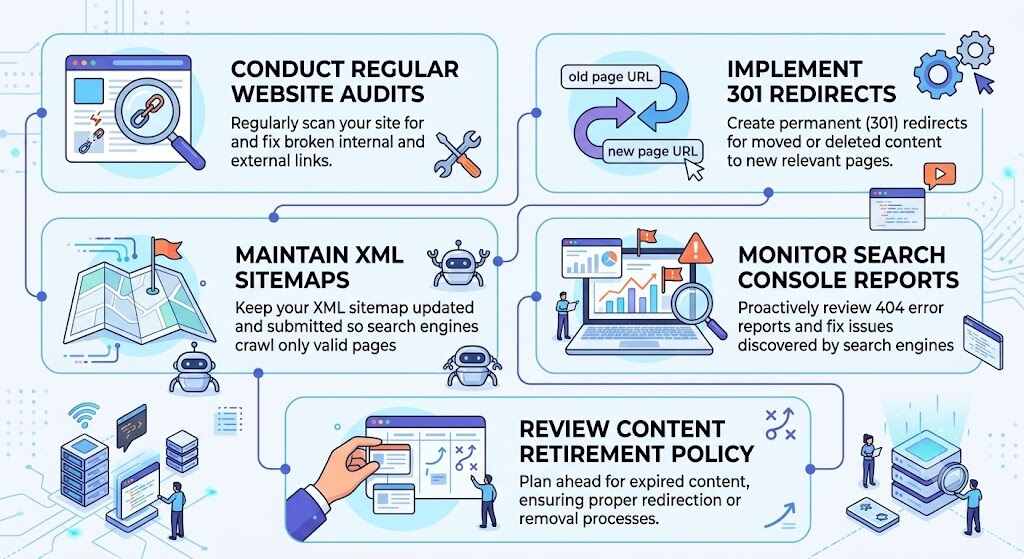
The best approach in the long term is simple:
- Conduct audits for broken links
- Keep redirect maps in case of migration
- Modify internal links when slugs get updated
- Make use of a custom 404 Not Found page
- Monitor Search Console for sudden increases in 404 and soft 404 errors
While a custom 404 page does not solve the problem, it helps users by providing them with options for search, navigation, and access to frequently visited links.
Conclusion
The 404 Not Found page, despite its small stature, offers quite a bit of information about how well the website is maintained. If handled properly, the 404 Not Found message will allow for navigation of the website to remain clear, help the search engines understand the content on the website, and help guide the user to other pages within the site. Ignoring such messages will cause the user’s confidence in the site to be damaged slowly over time. The best course of action is not to panic when you receive a 404 Not Found message, but to discern which ones are important and fix them.
Frequently Asked Questions
1. Is the 404 Not Found status bad for SEO?
Not necessarily. The 404 Not Found status should be expected for missing pages. Problems occur when important URLs, internal links, or popular pages are 404 Not Found on a regular basis and there is no reason for that.
2. How does the 404 differ from the soft 404?
The typical 404 will have the right HTTP status code. A soft 404 looks like not found to the user but sends an incorrect status or poor content signals to search engines.
3. Do all 404 Not Found pages need to be redirected?
Not necessarily. Only redirect when there is some alternative to provide. When there is no available content, then 404 Not Found status is fine.
4. Can users fix the 404 problem on their own?
Sometimes. The user can try to double-check the URL, refresh the page, clear cache, and other steps to fix the problem. But if the link is indeed broken, then the website owner needs to fix the problem.
5. Is the 410 Gone status better than 404 Not Found?
If the page is gone forever, and you want to signal this to the user, then 410 Gone is better than 404 Not Found.
