

The 502 Bad Gateway error is a server error that seems like a simple problem to begin with, but turns out to be quite complicated on closer inspection. All the user sees is a broken page. But the actual problem lies in some kind of interaction between multiple systems like a reverse proxy, CDN, load balancer, web server, application server, DNS layer, or TLS connection. As a result, the 502 Bad Gateway problem seems completely random to users, while for engineers it is a series of interrelated events.
At its core, the 502 Bad Gateway error is when a server working as a gateway or a proxy fails to get a proper response from the upstream server. Modern setups can include cases where NGINX talks to PHP-FPM, Cloudflare talks to the origin server, or CloudFront talks to an application load balancer or API backend.
What a 502 Bad Gateway Really Means in Production
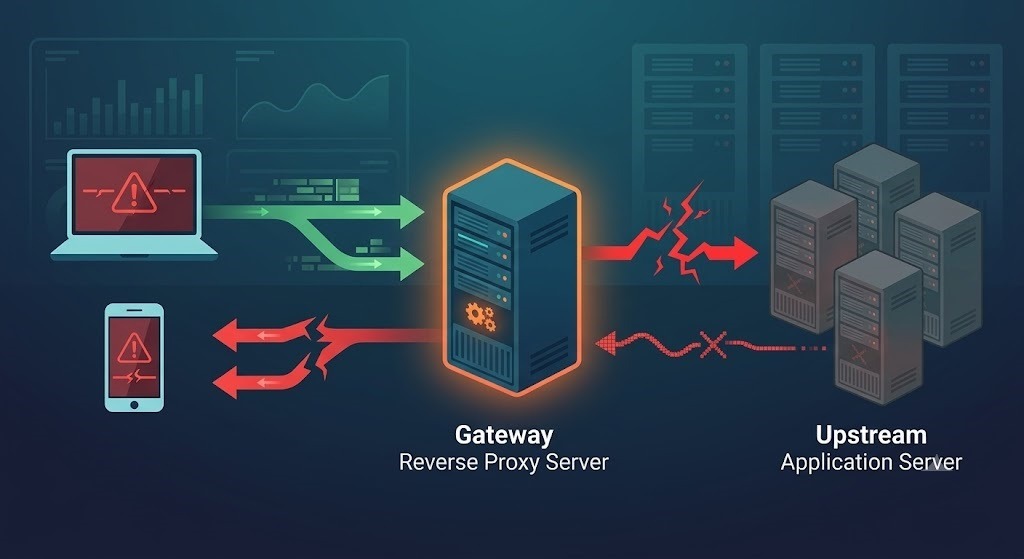
One of the fastest ways to understand what causes a 502 Bad Gateway problem is to forget about the statement “the website is down” and start considering the situation as “The layers can’t generate a proper response to each other”. It is important to understand that a 502 error may not necessarily be connected to your application code. In some cases, the application itself is functioning normally, but the proxy cannot connect to it, cannot perform TLS handshake, or times out before a response is obtained.
This is the reason why http error 502 often occurs after any infrastructure modifications. Companies update their certificates, change origin ports, move from origin to CDN traffic, or add a new proxy in front of NGINX. All of a sudden, everything is working properly inside, but outside the public connection starts responding with a 502 bad gateway error.
The Root Causes Behind 502 Bad Gateway Errors
These are some of the most common reasons you will face in practical technical situations:
- Origin server is down or under heavy load
- Configuration errors in NGINX and Apache upstreams
- Crashes of PHP-FPM, Node.js, Gunicorn or application worker processes
- Proxy and upstream timeout errors
- Origin server DNS resolution errors
- Problems with TLS/SSL handshake or certificate chain validation
- Firewall or security group blocking the upstream port
- Excessive request headers or cookies
- Malfunctioning CDN, edge functions or load balancers configurations
According to AWS documentation for CloudFront, common reasons for 502 error include TLS handshaking problems, unsupported cipher suites or protocols, invalid or expired origin certificates, DNS problems, wrong origin port numbers and problems with upstream load balancer and API. Also, Cloudflare and similar support resources mention origin crashes, increased traffic and origin response errors; there is an actual case when 502 bad gateway error was caused by oversized cookie headers.
How to Troubleshoot 502 Bad Gateway Step by Step
Identify the real source of the 502 response
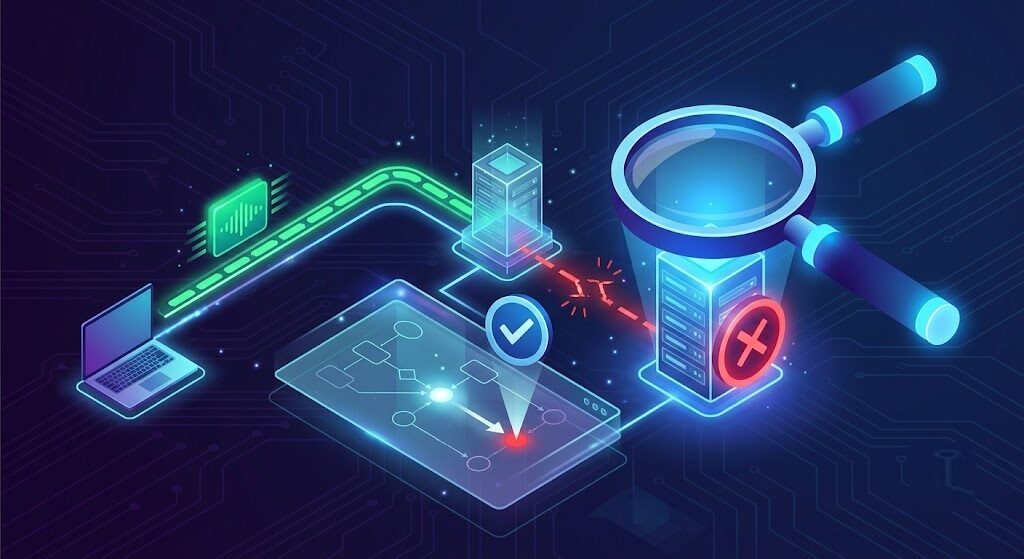
It is the first crucial step. If the page is served through Cloudflare or any other content delivery network (CDN), the bad gateway response might appear before the request hits the application. If an NGINX error page appears, then the problem is located between NGINX and the application server.
2. Check the health of the upstream immediately
Review the following metrics:
- CPU and memory usage
- Containers or services restarts
- Presence of application workers
- File/socket limits
- Deployment timings
One of the typical scenarios seen in technical support is increased traffic which does not crash the site completely but depletes all the worker processes. In this case, the load balancer is still alive, the homepage can be loaded, while the essential features like checkout, login or API calls start to produce 502 errors since the upstream workers cannot handle the requests.
3. Analyze proxy and application logs
For NGINX, start with the error.log. Then check the service logs for the application server at the exact time stamp. Such messages as connect() failed, upstream prematurely closed connection or no live upstreams considerably narrow the source of the 502 bad gateway.
4. Check DNS, port, and upstream target
In case the proxy is targeting the wrong IP address, an outdated hostname, or a closed port, even a healthy application might still show 502 bad gateway. This mistake happens frequently after any migration of the infrastructure, renaming of Kubernetes services, and replacement of the load balancers.
5. Test TLS connection
Connect to the origin directly and examine the certificate chain. According to CloudFront, any expired, self-signed, invalid, or misordered certificate will result in 502 bad gateway error if the edge cannot establish SSL/TLS connection with the origin.
6. Check request headers and size
It turns out that oversized headers and cookies might be the reason behind 502 errors. For instance, in one of the discussions on Cloudflare community, requests have failed only because the cookie header exceeded certain limit and generated 502 bad gateway error specific to that path.
Also Read: HTTP 404 Not Found: How to Troubleshoot and Fix the Error
Practical Examples Engineers Actually Run Into
Example 1: NGINX + PHP-FPM
A WooCommerce site starts reporting 502 bad gateway errors during flash sales. The actual problem doesn’t lie with NGINX – the PHP-FPM workers are saturated, and requests fail before the upstream is reached. Increasing the number of workers and decreasing lengthy plugin calls fix the 502.
Example 2: CloudFront + custom origin
The certificate gets renewed by a business owner, however, it is installed in an incorrect order. There are browser differences, yet CloudFront reports an http 502 error due to TLS validation between edge and origin being failed.
Example 3: Cloudflare + origin application
An API functions perfectly fine when accessed via the origin IP address, but fails when using Cloudflare. After analyzing the request headers, the team notices large cookies sent as part of a frontend experiment. Reducing the cookie size solves the problem.
Example 4: Double Proxy Architecture
A SaaS company uses CloudFront in front of NGINX and NGINX in front of app containers. The response buffering and mismatched timeouts result in 502 bad gateway errors, especially when accessing slow API endpoints.
How to Fix 502 Bad Gateway for Good
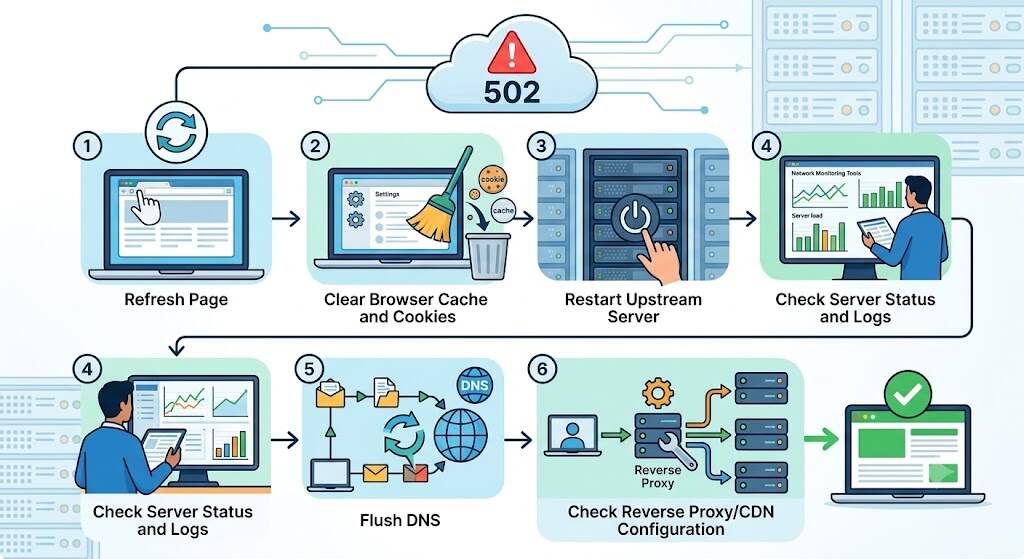
Here are some tips to permanently fix the 502 bad gateway problem:
- Configure appropriate upstream timeouts
- Track worker exhaustion and looped restarts
- Check certificates before deploying
- Maintain DNS and origin maps
- Reduce cookie and header overhead
- Test the entire public route, not localhost
- Implement health checks for the application and its upstreams
- Evaluate edge/CDN features after each configuration update
It is important to note that the biggest mistake you can make is considering the 502 bad gateway error to be a generic hosting problem. The truth is, in most cases, 502 is an accurate indication of where the chain of requests has been broken.
Conclusion
The 502 Bad Gateway error is more than just an inconvenience—it’s an indication. By approaching the problem systematically, starting with the gateway, then moving to the upstream, and finally looking at the logs, you’ll typically be able to locate the cause of the error sooner than you think. The people who do a good job fixing 502 Bad Gateway errors don’t guess—they know exactly where the transition occurred from a good to a bad gateway. That’s how you solve it—not by refreshing the page, but by knowing the architecture behind the bad gateway.
Frequently Asked Questions (FAQs)
Is a 502 Bad Gateway error caused by the user’s computer or the server?
Generally, it is the result of a problem on the server side. 502 Bad Gateway means that the server could not receive a valid response from another server.
How does 502 error differ from a 504 error?
The 502 error means that the upstream response is not valid. On the other hand, 504 error means that the upstream server has exceeded the response time.
Can DNS cause HTTP error 502?
Yes. HTTP error 502 can be caused by the fact that the gateway cannot resolve the origin.
Can Cloudflare or CloudFront cause bad gateway errors?
Yes, but generally indirectly. They can expose problems with the origin, TLS, DNS, and headers but do not cause them.
What actions will give you fast resolution of a 502 Bad Gateway error?
Identify which layer produced the error, check logs, validate the upstream, test TLS, validate DNS and ports, and look at infrastructure changes.
